DarkMatter Software / Linux System Intelligence

SysMon 3.0

Total visibility. Total control.

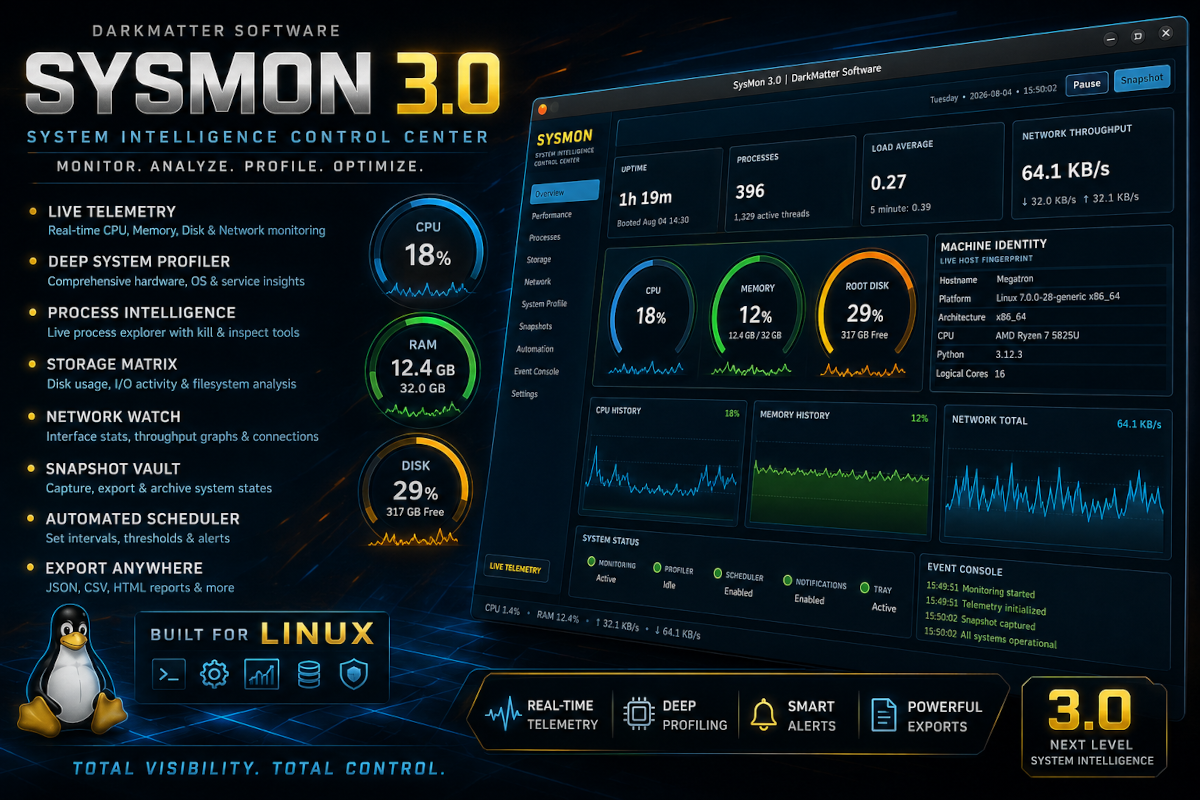
The original DarkMatter system monitor has evolved into a full native PySide6 command center. Watch the machine breathe in real time, inspect its processes, map its storage, profile its hardware, archive its state, and export the evidence.

Version 3.0.0 Python + PySide6 Linux Desktop Free Download
DarkMatter SysMon 3.0 interface showing live telemetry, system gauges, profile tools, and exports

Two Proven Editions

Choose your control center.

SysMon 3.0 is the major visual and functional upgrade. SysMon 1.0 remains available as the compact, dependable Go/Fyne original for users who prefer the earlier native build.

Classic Edition

SysMon 1.0

The original Go/Fyne release remains a fast, stable, and compact system monitor. It preserves the proven earlier interface and monitoring engine without the expanded workspaces introduced in version 3.0.

1.0Original release
GoCompiled engine
FyneNative GUI
SysMon 1.0 is not obsolete or abandoned. It remains available as the lean original, while 3.0 serves users who want the expanded visual and analytical arsenal.

A Living View of Linux

The machine stops being a black box.

SysMon 3.0 organizes live metrics, deep inspection, historical activity, and system state into a single native desktop interface built to remain useful while it looks alive.

01 / TELEMETRY

Live Performance Lab

Rolling CPU and memory graphs, per-core activity, load averages, swap pressure, threads, and throughput.

02 / PROCESSES

Process Intelligence

Search, sort, inspect, and manage active processes without abandoning the main monitoring environment.

03 / STORAGE

Storage Matrix

Filesystem capacity, mounted devices, usage pressure, disk operations, and live read/write activity.

04 / NETWORK

Network Watch

Interface inventory, traffic rates, connection visibility, and rolling upload and download history.

05 / PROFILE

Deep System Profiler

Collect Linux, kernel, CPU, memory, storage, service, network, hardware, and optional security intelligence.

06 / SNAPSHOTS

Snapshot Vault

Capture system states, attach profile data, preserve notes, and export records for later comparison.

07 / AUTOMATION

Scheduler and Alerts

Automate snapshot intervals and define warning thresholds for CPU, memory, and disk pressure.

08 / EXPORT

Portable Evidence

Move telemetry and collected intelligence into JSON, CSV, HTML, or text reports.

Interface Architecture

Busy with purpose.

Every workspace has a defined job. Overview summarizes the host, Performance exposes pressure, Storage and Network reveal movement, and System Profile drills below the surface.

Overview Host identity, uptime, processes, load, throughput, gauges, and history.
Performance Per-core activity and immediate saturation readings.
System Profile Human-readable intelligence gathered section by section.
Settings Themes, thresholds, notifications, snapshot behavior, and tray operation.
SysMon 3.0 interface overview

Major Version Upgrade

One lineage. Two different machines.

Version 3.0 does not erase the original. It takes the same system-awareness mission and expands it into a broader, more visual, more configurable desktop environment.

SysMon 1.0

Go + Fyne / Classic

  • Compact compiled application
  • Reliable live resource monitoring
  • System profile and snapshot foundation
  • Lean dependency footprint
  • Stable original DarkMatter release

SysMon 3.0

Python + PySide6 / Current

  • Expanded multi-workspace control center
  • Animated graphs, gauges, and per-core views
  • Process, storage, and network intelligence
  • Live profile collection and richer exports
  • Scheduler, alerts, notifications, and tray support
  • Five visual themes with persistent settings

Source Edition

Unpack. Prepare. Launch.

SysMon 3.0 uses a local Python virtual environment so its PySide6 and psutil dependencies stay contained beside the application.

DarkMatter SysMon icon

Runtime Requirements

Linux desktop, Python 3.10 or newer, and pip. Elevated permissions are optional and are only relevant to profile probes that Linux restricts for ordinary users.

TERMINAL / SYSMON 3.0
# Enter the extracted SysMon directory
$ cd SysMon_PySide6_3.0

# Create and activate an isolated environment
$ python3 -m venv .venv
$ source .venv/bin/activate

# Install the native GUI and telemetry dependencies
$ pip install -r requirements.txt

# Launch the control center
$ python sysmon.py

DarkMatter Software Release 3.0

Monitor. Analyze. Profile. Optimize.

Keep the lean Go/Fyne original or step into the full PySide6 command center. Both editions remain available from the official SysMon release archive.