Manual or Automatic Scanning
Choose a specific project tree or scan the current user’s home folder for every directory named venv or .venv.
Scan your projects, identify real venv and .venv folders, review their sizes, and reclaim disk space from one polished native desktop interface. No Flask server. No browser shell. No pip dependency parade.
Includes the Python source file, documentation, and artwork required to create your own standalone build with PyInstaller.
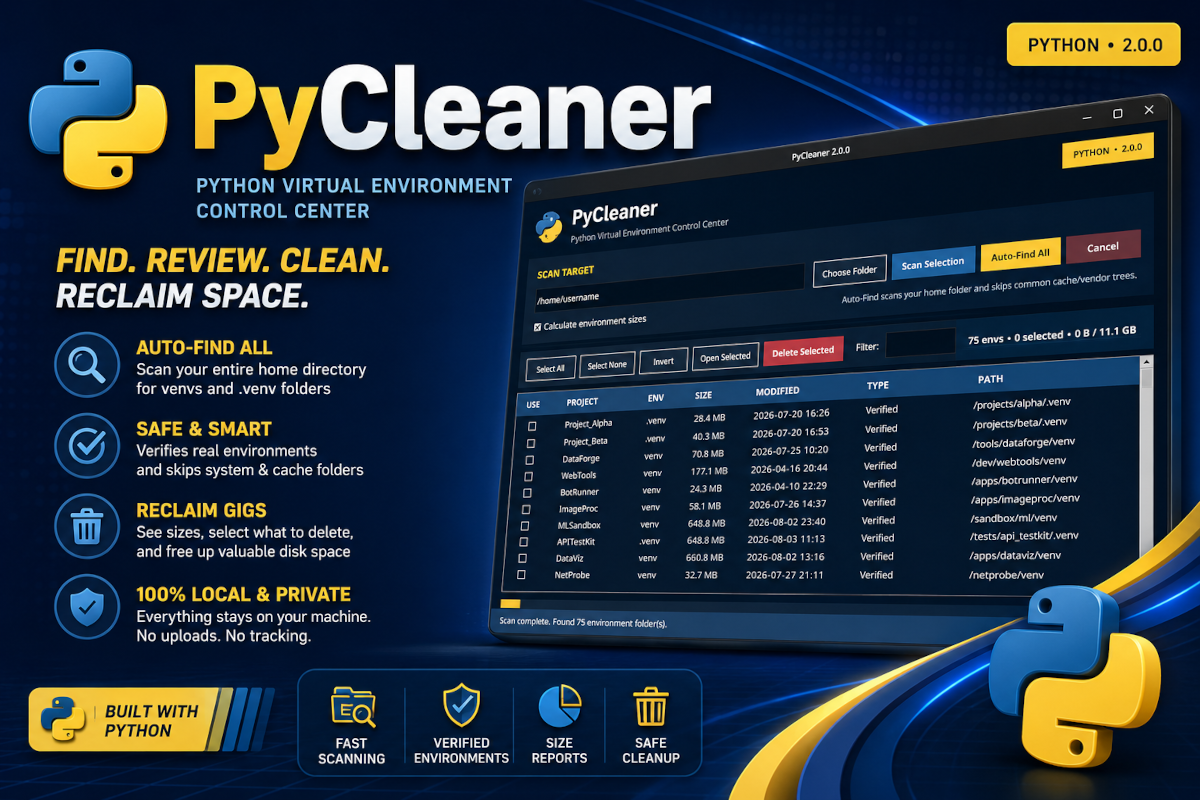
PyCleaner turns a repetitive filesystem chore into a visual, controlled workflow where every discovered environment can be inspected before anything is removed.
Choose a specific project tree or scan the current user’s home folder for every directory named venv or .venv.
PyCleaner identifies genuine Python environments by checking for pyvenv.cfg instead of blindly trusting folder names.
Calculate individual environment sizes and see the total amount of disk space that can be reclaimed before selecting anything.
Select checkbox cells, sort columns, filter results, invert selections, open project folders, or operate entirely from the keyboard.
Scanning and deletion run away from the main interface thread, keeping the application responsive while larger project trees are processed.
Deletion is limited to selected folders whose final name is exactly venv or .venv, with explicit confirmation required.
This release is intentionally distributed as Python source rather than a precompiled binary. The download includes the application, documentation, and artwork needed for a local PyInstaller build.
# Install the build tool
python3 -m pip install pyinstaller

# Build a single-file GUI executable
pyinstaller --onefile PyCleaner.py

# Result
dist/PyCleaner
Deletion is permanent, so PyCleaner puts review and verification ahead of speed.
venv or .venv are eligible.DELETE.Run the source directly with Python 3.8 or newer and Tkinter.
# Linux / macOS
python3 PyCleaner.py

# Windows
python PyCleaner.py

# Ubuntu / Debian, when Tkinter is absent
sudo apt install python3-tk
Download PyCleaner 2.0, review the included documentation, run the source directly, or compile a standalone build tailored to your platform.
Download PyCleaner 2.0